 ADMIN
How to save on AI with Codex and Claude Code in YAADMIN
If you already pay for ChatGPT or Claude, that subscription can also be useful in YAADMIN: helping you analyze computer performance, prepare reports, work with files, and complete tasks through connected tools.

If you already pay for ChatGPT or Claude, that subscription can also be useful in YAADMIN: helping you analyze computer performance, prepare reports, work with files, and complete tasks through connected tools.
The main financial benefit is using your subscription’s included allowance for work tasks. With supported sign-in through ChatGPT or Claude, the corresponding Codex or Claude Code requests count toward your plan. Working within that allowance may not require separate API spending.
Codex: sign-in methods · Claude Code with a subscription.
For example, if your tasks cost $100 a month through the API and fit within a $20 subscription, the difference is $80 a month, or $960 a year. Below are the calculations and a simple explanation of Shared and Personal modes.
API and subscriptions in plain language
An API works like a meter. The application sends data to the model and receives responses, while the cost depends on the model and the volume processed. Both the information sent and the response generated count toward usage. A multi-step task may require several requests.
A subscription gives you a usage allowance for a monthly fee. You sign in to Codex through ChatGPT or to Claude Code through Claude and use your plan’s allowance. This is convenient for regular personal work: you know the plan’s price in advance.
Subscriptions have limits. How quickly you use them depends on the model, task complexity, file sizes, and how long you work. Additional credits beyond the included allowance may cost extra.
Codex usage conditions · Claude Code usage conditions.
How much does it cost to get started?
For a clear comparison, let’s take two entry-level paid options.
| What you use in YAADMIN | Subscription | Monthly price |
|---|---|---|
| Codex signed in through ChatGPT | ChatGPT Plus | $20 |
| Claude Code signed in through Claude | Claude Pro | $20 |
These are prices in US dollars for monthly billing on the providers’ websites, checked on November 19, 2026, excluding local taxes. Annual plans and other purchase methods may differ.
OpenAI pricing · Anthropic pricing.
You can choose one service. If you pay for both ChatGPT Plus and Claude Pro, the total is $40 a month before taxes.
How much can you save?
Below are sample calculations for one user, assuming the entire workload being compared fits within a $20 subscription. They illustrate the arithmetic of savings; you need to test the subscription’s actual capacity on your own tasks. The table uses actual API spending after available discounts and credits. Those costs alone do not determine how much work a plan will cover.
| Your monthly API spending | Codex with Plus | Claude Code with Pro | Monthly savings with one service | Per year |
|---|---|---|---|---|
| $10 | $20 | $20 | $10 more expensive | $120 more expensive |
| $40 | $20 | $20 | $20 | $240 |
| $60 | $20 | $20 | $40 | $480 |
| $100 | $20 | $20 | $80 | $960 |
| $200 | $20 | $20 | $180 | $2 160 |
The Codex and Claude Code columns are two alternative options, each costing $20. Annual amounts are the monthly difference × 12, assuming costs remain unchanged.
In the $100 → $20 scenario, spending falls by 80%. If you spend only $10 a month through the API and do not already have a subscription, the API is cheaper.
The calculation covers AI fees and excludes additional credits, taxes, the YAADMIN license, and other paid services. If you need a more expensive plan or additional usage, use their actual cost in the comparison.
Getting more value from a subscription you already pay for
Suppose you already pay $20 for ChatGPT Plus or Claude Pro for your own work. You also spend $60 through the API on tasks in YAADMIN.
If you can complete those tasks through the corresponding client within your subscription’s available allowance, the calculation is:
Before: $20 for the subscription + $60 for API usage = $80 a month.
After: $20 for the subscription + $0 extra for using the included allowance = $20 a month.
Difference: $60 a month, or $720 a year.
You get more value from a subscription you already pay for. At the same time, you use its existing allowance: Claude and Claude Code share a limit, while at OpenAI, Codex usage may share an allowance with other agentic features.
Claude: shared limits · OpenAI: included usage.
How this helps in everyday work
YAADMIN combines chat with connected tools. You describe the result you want in everyday language; available modules let you retrieve data and perform actions. Below are examples of tasks when the necessary tools and permissions are configured.
Diagnosing a slow server
“Check the accounting server. Show which processes use the most CPU and memory, and explain the result.”
Available diagnostic tools can collect the metrics, and Codex or Claude Code can help analyze them. You work on the task in one chat and get an explanation grounded in the data collected.
Investigating a printing problem
“Printing has stopped working on this computer. Check the print service and queue, and suggest a fix.”
AI can use permitted system tools to investigate. If an action is needed, such as restarting a service, whether it runs depends on the permissions granted and the approval settings.
Both examples rely on documented agent capabilities: system information, PowerShell, CMD, and application management.
Preparing an Excel spreadsheet
“Add an ‘Amount’ column, fill in the formulas, calculate totals by department, and format the spreadsheet.”
Depending on the tools available, the work can be done directly with the file or through an open Excel window. You specify the result, and AI helps determine and carry out the steps.
Working with files and spreadsheets · Working with the screen and input.
The practical benefit is one conversation to describe the task, work with tools, and get the result. The subscription determines how you pay for AI; YAADMIN modules and permissions determine which actions are available.
How Shared Codex and Shared Claude Code work
Shared means the connection is configured at the level of your YAADMIN workspace and can be reused. Core is the main YAADMIN application serving that workspace.
Shared Codex uses the configured Codex connection. When signed in through ChatGPT, the corresponding work counts toward the connected plan’s allowance.
Shared Claude Code uses the configured Claude Code connection. If Claude subscription is selected, the corresponding work counts toward the Claude subscription. API key mode uses API billing.
For the user, it works like this:
- You configure the connection and sign in to your own account through the supported official client.
- You select the corresponding Shared profile in YAADMIN.
- You write a task in chat from your computer, laptop, or another device with access to YAADMIN.
- The existing connection is used, and usage is charged to the connected account.
For example, you work on a laptop in the morning and on your home PC in the evening. By opening the same YAADMIN, you can use your configured profile. Configuration is kept in one workspace; your devices become convenient access points.
How to choose between Shared and Personal
These names tell you which connection to use.
| Mode | Plain explanation | When it is useful |
|---|---|---|
| Shared Codex / Shared Claude Code | A shared connection profile configured in YAADMIN | For the owner to use their own connection in their own workspace |
| Personal Codex / Personal Claude Code | A separate connection in the user’s profile | For each person to work with their own account and plan |
| Shared API | An API connection configured by the administrator | To organize employee access through a shared API budget under the provider’s applicable terms |
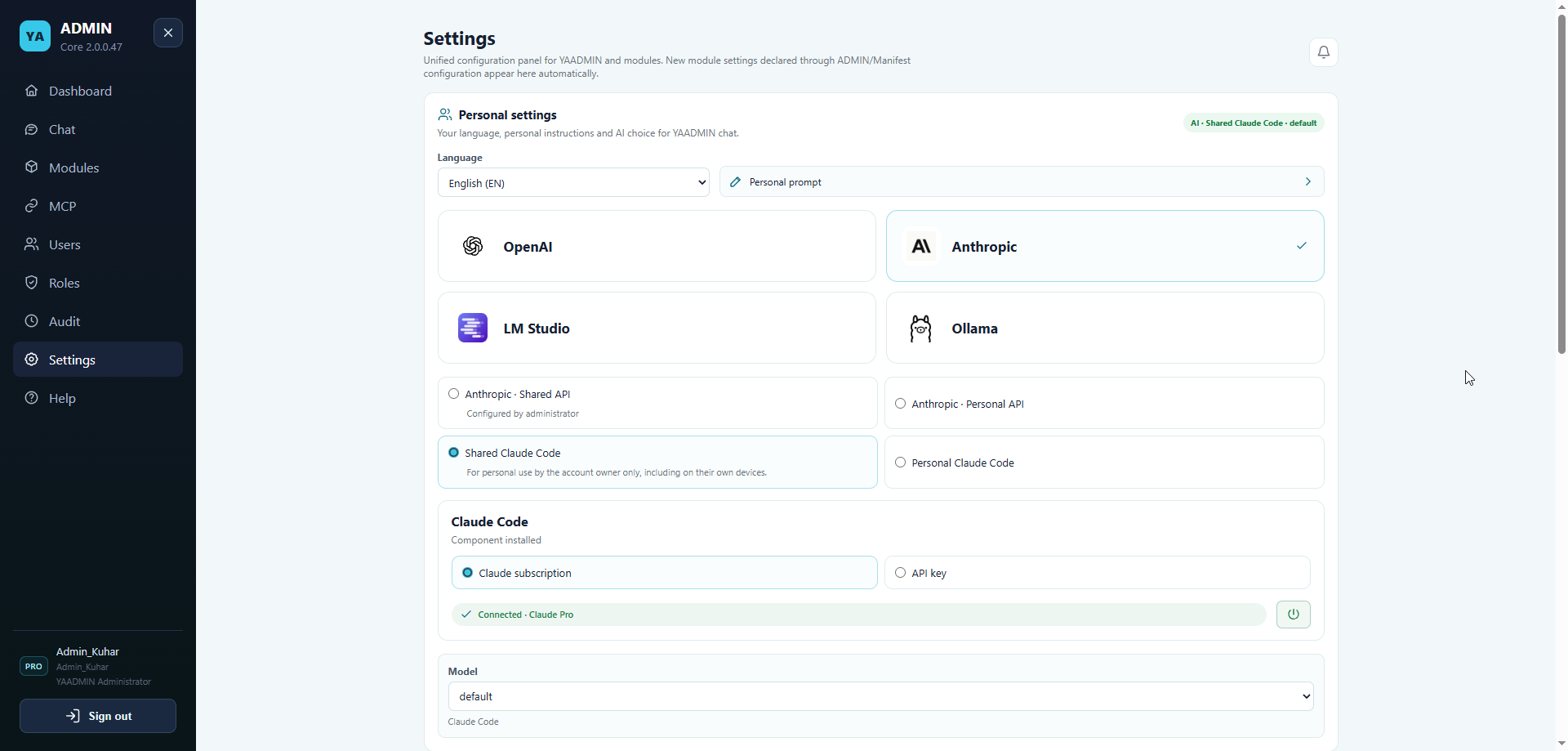
A personal subscription remains access for its owner. This is exactly what the note under Shared Claude Code in the screenshot says. For several people, use their separate accounts, appropriate team seats, or a permitted shared API connection. OpenAI and Anthropic define personal accounts as individual accounts.
OpenAI account rules · Anthropic account rules.
Access to YAADMIN tools is configured separately: each role is assigned the computers, files, and modules it can work with. The selected AI performs actions available through YAADMIN subject to those checks.
Codex connections and tool permissions.
What the connection looks like in settings
The connection example shown in the provided screenshot:
Settings → Anthropic → Shared Claude Code → Claude subscription → Connected · Claude Pro.
The sequence is straightforward: Anthropic is selected, a Shared Claude Code profile is used, sign-in is through a subscription, and the connected plan is Claude Pro.
Notice the two separate choices: Shared / Personal determines the connection profile, while subscription / API key determines billing. To save by using the included allowance, you need subscription mode.
Codex follows the same principle: connecting through your own ChatGPT account uses your plan’s access, while an API key puts the corresponding work on API billing.
If you need more usage
When an entry-level plan is not enough, compare a higher-tier subscription, additional credits, and API billing against your actual workload.
As of the verification date, ChatGPT Pro has $100, $200, and $500 monthly tiers. Claude offers Max at $100 and Ultra at $200 a month. These plans have larger included allowances.
OpenAI pricing · Anthropic pricing.
Higher-tier plans also offer a separate benefit for those combining a subscription with their own API applications:
- ChatGPT Pro: after activating the corresponding feature, $100, $200, or $500 in API credits per month, depending on the tier.
- Claude Max and Ultra: after activation, $100 or $200 in API credits per month, respectively.
These credits have separate usage conditions and expiration dates. They do not increase the included Codex or Claude Code allowance. In particular, OpenAI’s credit program does not cover Codex with an API key, and Anthropic’s does not cover interactive Claude Code or extra usage in it.
OpenAI API credits · Anthropic API credits.
Where to start
The best first step is to connect a subscription you already use and try a few familiar tasks: analyzing a log, preparing a spreadsheet, or checking a computer’s status. See how much of the allowance they use and whether you are happy with the result.
For a user whose work fits within the included allowance, the benefit is concrete: lower separate API spending, a known subscription price, and access to their work tools through YAADMIN chat.
Open YAADMIN settings, select Codex or Claude Code, and connect your own account so your paid subscription can help with your everyday tasks.